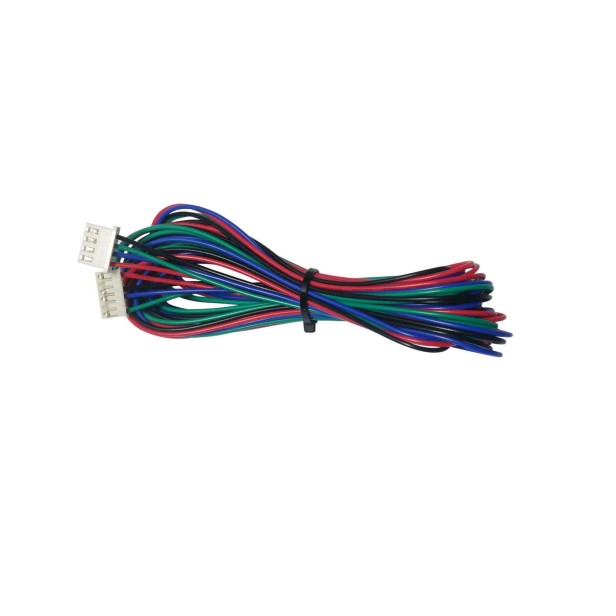
FEATURES – NEMA 17 STEPPER MOTOR EXTENSION CABLE
- Compatibility: NEMA 17 bipolar stepper motors.
- Connectors: JST-XH 2.54 mm.
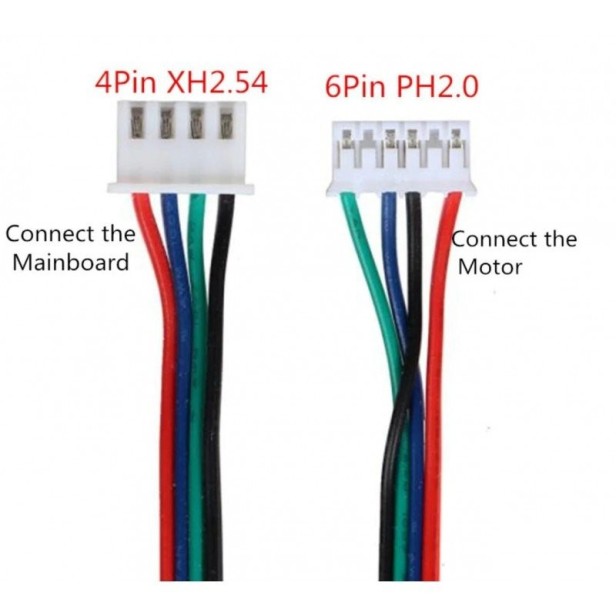
- Pin options: 4-pin or 6-pin versions available.
- Wire gauge: 26 AWG (ideal for stepper signal and power).
- Maximum temperature: 80 °C.
- Maximum voltage: 300 V.
- Lengths available: 1 meter / 2 meters.
- Approx. weight: 23 g (1 m) / 46 g (2 m).
- Insulation: high-resistance flexible PVC.
This NEMA 17 stepper motor extension cable is perfect for 3D printers, CNC machines, plotters and laser engravers that need extra distance between the stepper motor and the control board.
Available in both 4-pin and 6-pin formats, it is compatible with the most common motor drivers such as A4988, DRV8825, TMC2100, TMC2208, TMC2209 and more.
Choose between 1 m or 2 m to keep your machine wiring organized and flexible, especially in large-format printers or custom builds.
USES & APPLICATIONS
- Extend the connection between NEMA 17 motor and controller board (RAMPS, SKR, MKS, BTT, Creality, etc.).
- Custom wiring for large 3D printers such as Ender-5 Plus, CR-10 Max, Artillery Sidewinder, Anycubic Kobra Max.
- CNC and laser machines where stepper motors are far from the drivers.
- Replace short or damaged stock cables.
- Modify or rebuild printed 3D structures or DIY robotics systems.
ADVANTAGES OF THIS EXTENSION CABLE
- ✔️ Available in 1 m and 2 m for maximum reach.
- ✔️ Fully compatible with most bipolar NEMA 17 motors.
- ✔️ JST-XH connectors pre-installed for immediate use.
- ✔️ Heat-resistant insulation up to 80 °C and 300 V.
- ✔️ Maintains motor signal integrity even at longer distances.
- ✔️ Flexible, durable cable ideal for dynamic machine movement.
FAQ – FREQUENTLY ASKED QUESTIONS
Is this compatible with any NEMA 17 motor?
Yes, as long as your motor uses 4-pin or JST-XH connectors. Most NEMA 17 motors in 3D printers are 4-pin.
Can I use it with Creality printers (Ender, CR-10)?
✔️ Yes, it is compatible with Creality, Anycubic, Artillery, Elegoo, Biqu/BTT and many more.
Does it work with drivers like TMC2209?
✔️ Yes. It works perfectly with A4988, DRV8825, TMC2100, TMC2208 and TMC2209.
Do I need 4 pins or 6 pins?
Most NEMA 17 stepper motors use 4 wires. Some cables include 6-pin housings but only 4 wires are active.
Can I use this in CNC machines?
✔️ Yes. Ideal for CNC routers, laser engravers, plotters and robotics systems.
HOW TO USE THIS NEMA 17 EXTENSION CABLE
Installation is simple, but proper wiring is essential for reliable motor performance.
1. Identify your motor’s pin layout
Most NEMA 17 motors use two coils labeled A and B. Make sure the order of the wires matches the board’s output.
2. Connect the JST-XH plug to the controller
Locate the motor output (X, Y, Z or E) and plug in the connector, respecting orientation.
3. Connect the other end to the motor
Insert carefully. If your motor has a different connector (e.g., Molex), use an adapter.
4. Power on the machine
The extension cable does not require configuration — it simply lengthens the connection.
5. Test motor movement
- If the motor vibrates, stalls or moves incorrectly: check wire order.
- Verify all connectors are seated firmly.
- Ensure no wires are bent sharply.
IMPORTANT CONSIDERATIONS
- Do not change the order of the wires. Each brand uses different color codes.
- Never unplug a stepper motor while the machine is on — it can damage the drivers.
- Avoid sharp bends. 26 AWG wires are flexible but can break internally.
- Secure the cable with zip ties to keep it safe from belts or moving parts.
- Keep extra slack in large printers to avoid tension during movement.
- Avoid cable lengths over 2 m unless necessary, as very long wires can reduce torque.
SAFETY PRECAUTIONS
- Turn off and unplug the machine before handling motor cables.
- Keep the cable away from hot components: hotend, heater block, heated bed.
- Do not use damaged or frayed cables as they may cause erratic behavior.
- If the motor overheats, makes loud noises or loses steps, stop immediately and check wiring.
The perfect cable for expanding your 3D printer or CNC system with maximum reliability and safety.